
Posting and Collecting Administrative Fees
There are times when a practice may include an administrative fee as part of the cost of services provided. These fees can reflect the time and resources required to support activities such as managing payment plans, handling declined payments, and filing and managing insurance.
Tops recommends that practices clearly communicate their fee structure in writing and ensure patients understand that administrative costs may apply depending on the services and payment arrangements selected.
Best Practice for Applying Administrative Fees
When possible, administrative costs should be incorporated into the total fee for a service, rather than listed as a separate line item. This approach is most commonly used for one-time transactions.
However, in some cases, such as long-term contracts or recurring payment plans, it may be necessary to post administrative fees separately in order to properly structure and manage the patient’s financial arrangement or to track the administrative fee for accounting purposes.
Important:
- Administrative fees should not be presented as a direct surcharge for credit card use
- Fees should reflect the broader administrative cost of services or conveniences provided
- Patients should be informed in advance, in writing, of any applicable administrative costs
Scenario: Treatment with Administrative Fees
The patient elects treatment and enters into a payment arrangement that includes administrative costs. In this scenario, the administrative fee is applied separately to allow for accurate tracking and payment scheduling across the life of the contract.
Contract Amount: $6000
Downpayment: $1000
Remaining due: $5000
4% Administrative Fee: $200
Months in Treatment: 12
Total amount owed: $5200
Monthly Payment: $433
Step 1 - Record the Contract for the Treatment
- Create the contract for the treatment amount.
- Record the down payment and scheduled monthly payments.
The contract may or may not include the administrative fee depending on how your practice structures fees.

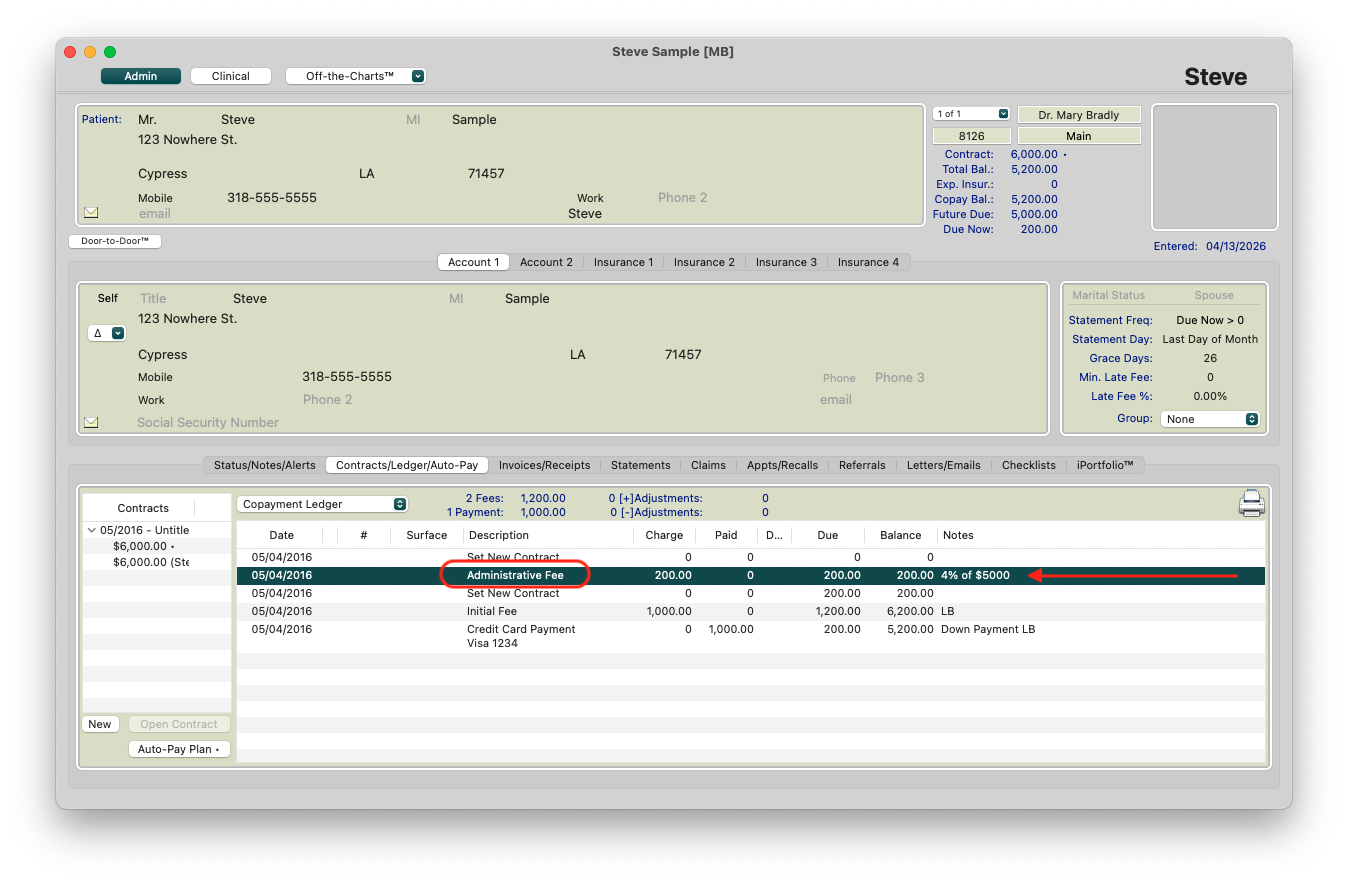
Step 2: Post the Administrative Fee
- Open the Transaction Window (Command-T).
- Post an Administrative Fee to the patient’s ledger.
If needed, create this fee type under:
Tops Ortho > Practice Setup > Fee Schedule
- Be sure to exclude the administrative fee from insurance claims
Step 3: Create the AutoPay plan
- Set up the AutoPay plan using the total balance owed, including any administrative fees.
- Adjust the first payment if needed to account for how the administrative fee is applied.

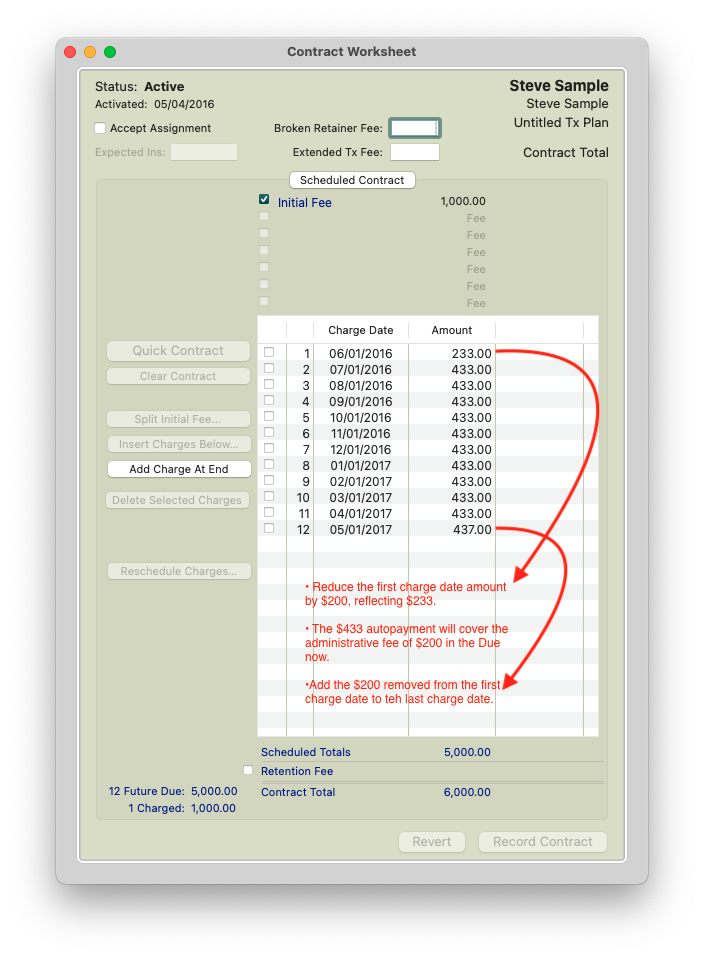
Step 4 - Review and Modify the scheduled contract monthlies of the contract
Ensure:
- The ledger reflects any administrative fees posted (eg. $200)
- The AutoPay plan aligns with the total balance due (eg. $5200)
- Scheduled monthly charges in the contract accurately reflect the agreed-upon terms (eg. $5000)
|
|
|
Step 5 - Charge out the initial fee and collect the down payment

The patient will have a Due Now of $200.00. On the first charge date of the contract (eg. 06/01/2016) an additional $233 will post to the patient's due now. The patient will now reflect $433 as Due Now. The $433 will be paid on the first autopay date of 6/1/2016.
Scenario: One-Time Payment with Administrative Costs Included
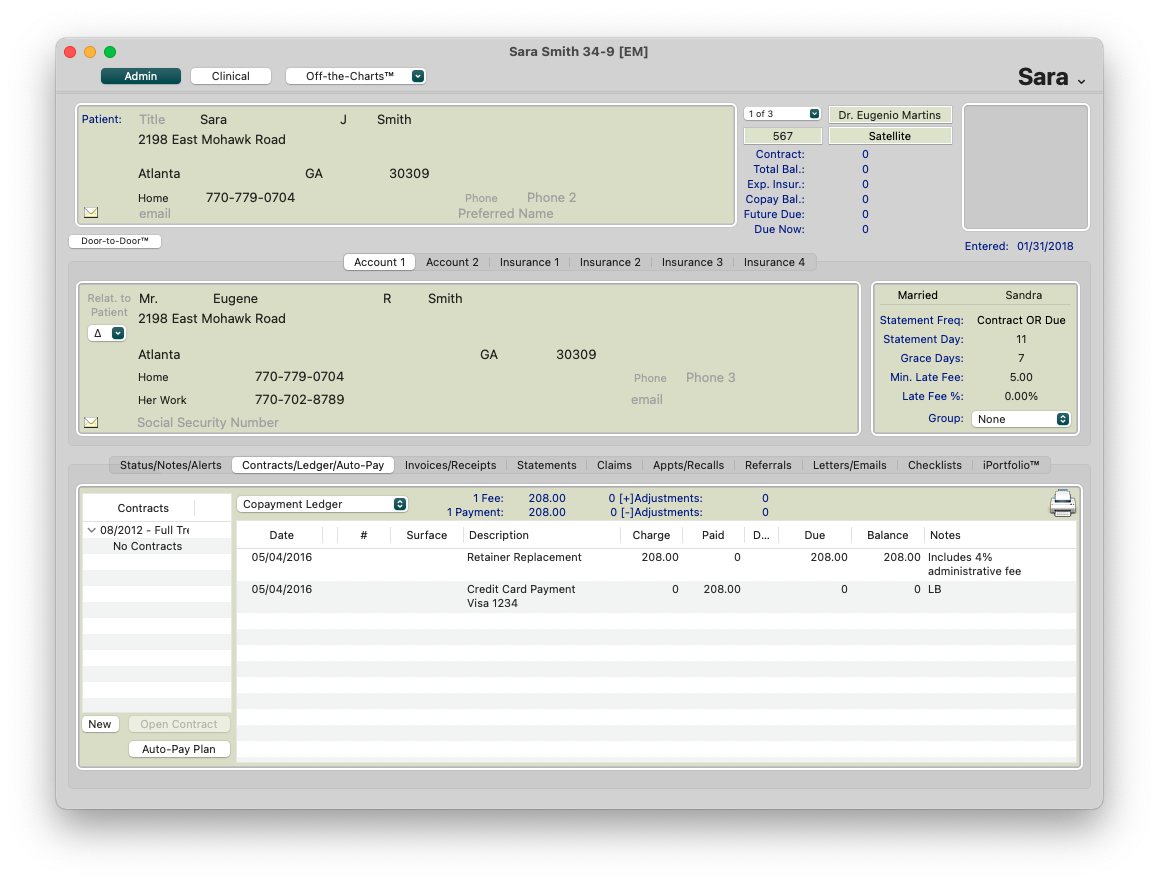
For one-time payments, it is often simpler to include administrative costs directly in the total fee.
Step 1: Post the transaction fee for the treatment.
Example:
- Retainer Replacement Fee: $200
- Total Fee Charged: $208
A single charge of $208 is posted and collected, rather than separating out the administrative portion.
Summary
- Administrative fees represent the cost of services and operational support, not a payment surcharge.
- Best practice: Include administrative costs in the total fee when possible (especially for one-time transactions).
- For contracts or payment plans, administrative fees may be posted separately for flexibility and tracking.
- Always communicate fees clearly in writing so patients understand the total cost of services. (eg. Signs at the front desk, Financial and Insurance Billing Agreements, etc).