
Create a Contract With Insurance
When a patient has insurance and chooses to pay their out-of-pocket responsibility through a down payment and monthly installments, Tops allows you to create a Treatment Contract with Insurance that accounts for both the patient's financial responsibility and the insurance company's expected contribution.
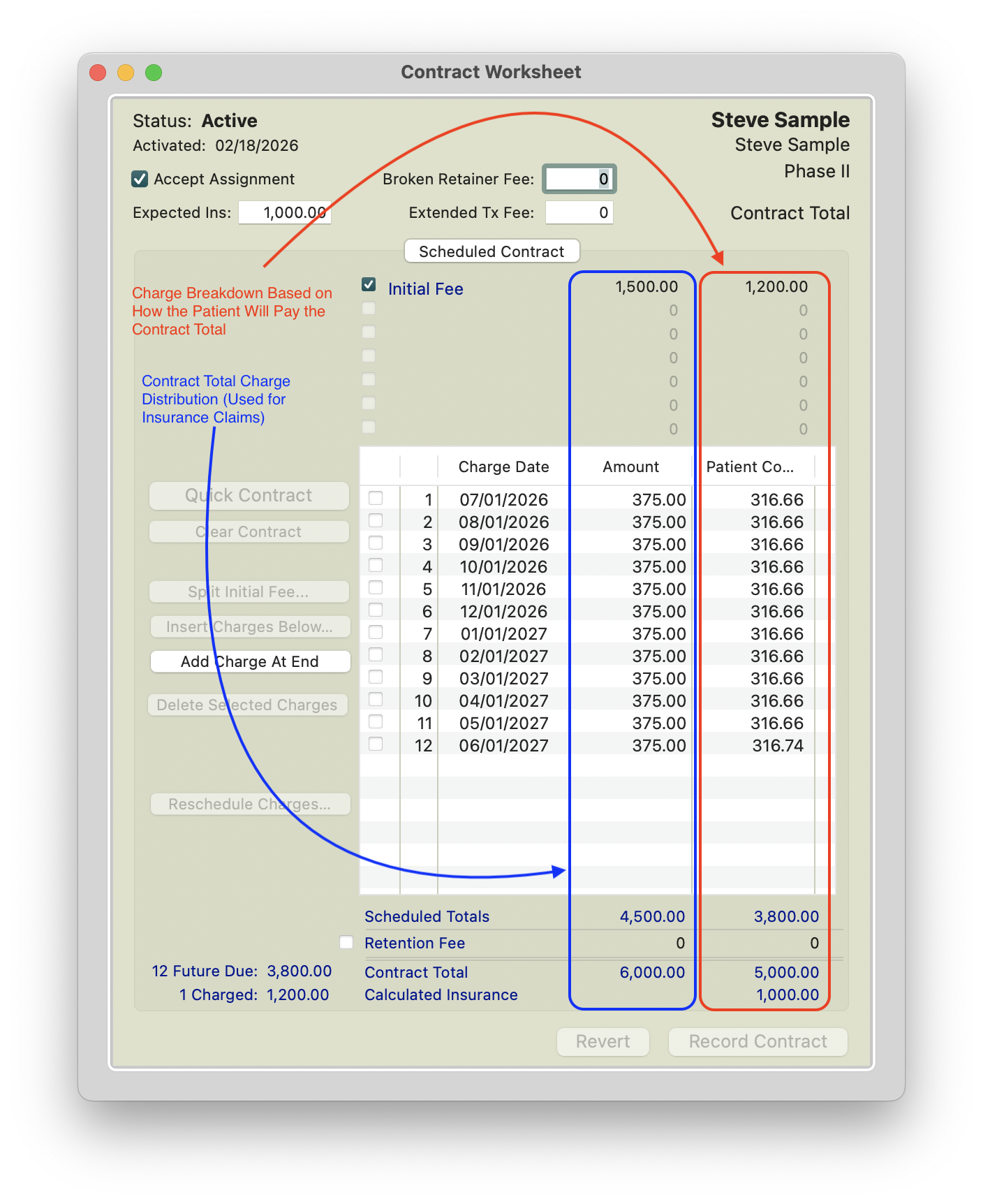
When creating a contract that accepts assignment of insurance benefits, it's important to understand the difference between the Amount and Copay columns.
Amount Column: Represents how the total treatment fee is structured and reported to the insurance company. The Initial Fee and monthly charges should reflect the expected length of treatment, including the minimum number of months the patient is expected to be in treatment.
Copay Column: Represents the portion of the treatment fee remaining after expected insurance benefits are considered. This amount is divided between the Initial Fee (down payment) and scheduled monthly charges based on the practice's financial arrangements with the patient.
The patient's Initial Fee may include their upfront payment and any applicable discounts or courtesies. The remaining copay responsibility is distributed across future monthly charges, which the patient pays in installments.
Keep in mind: Charging the Initial Fee and collecting the payment are two separate actions. Once the Initial Fee is charged, the amount will appear in the patient's Due Now balance, even if payment has not yet been collected. Conversely, if the patient pays in advance, their payment will appear as a credit in Due Now until the contract is activated and the Initial Fee is charged.
When Should the Contract Be Activated?
It's best to activate the Treatment Contract on the date of initial appliance placement.
Why does this matter? The contract activation date impacts the procedure date generated in Box 24 of the insurance claim.
Activating the contract on the date treatment actually begins helps ensure the procedure date on the insurance claim matches the patient's Treatment Start Date.
Before Activating the Treatment Contract
Tops Tip: We recommend recording the contract first and waiting to activate it until the patient's payment has been collected and they are ready to begin treatment.
Even when financial arrangements have been confirmed, patients may change their minds about how they want to pay. For example, a patient who originally agreed to pay in full may decide to use their HSA card to make monthly payments instead.
By collecting payment before activating the contract, the practice has an opportunity to make any necessary changes to the payment arrangements before the Initial Fee is charged.
Remember: Once the Initial Fee has been charged, it cannot be modified, deleted, or voided. Contract activation should ideally coincide with the initial placement of appliances.
Let's Get Started With an Example
The following example is based upon a typical contract including insurance:
Estimated Treatment Length: 12-18 months
Contract Total: $6000.00
Patient Insurance Benefit: $1000.00
Patient Downpayment : $1000.00
Courtesy/Family Discount : $200.00
Patient Remaining Balance: $3800
Patient selected a payment plan: 12 months at $316.66/month
The Quick Contract and Contract Worksheet
Treatment Contracts are created and recorded in the Contracts/Ledgers tab of the patient's chart. Before beginning, make sure you're working with the correct Treatment Phase and Treatment Plan.
- Open the patient's chart; go to View > Patient Info or press Command I.
- Click the Contracts/Ledgers tab.
- Click New and select the appropriate Treatment Plan.
- Click Quick Contract. The Quick Contract Worksheet opens.
- Check the box Accept Assignment; the right side of the contract worksheet displays.

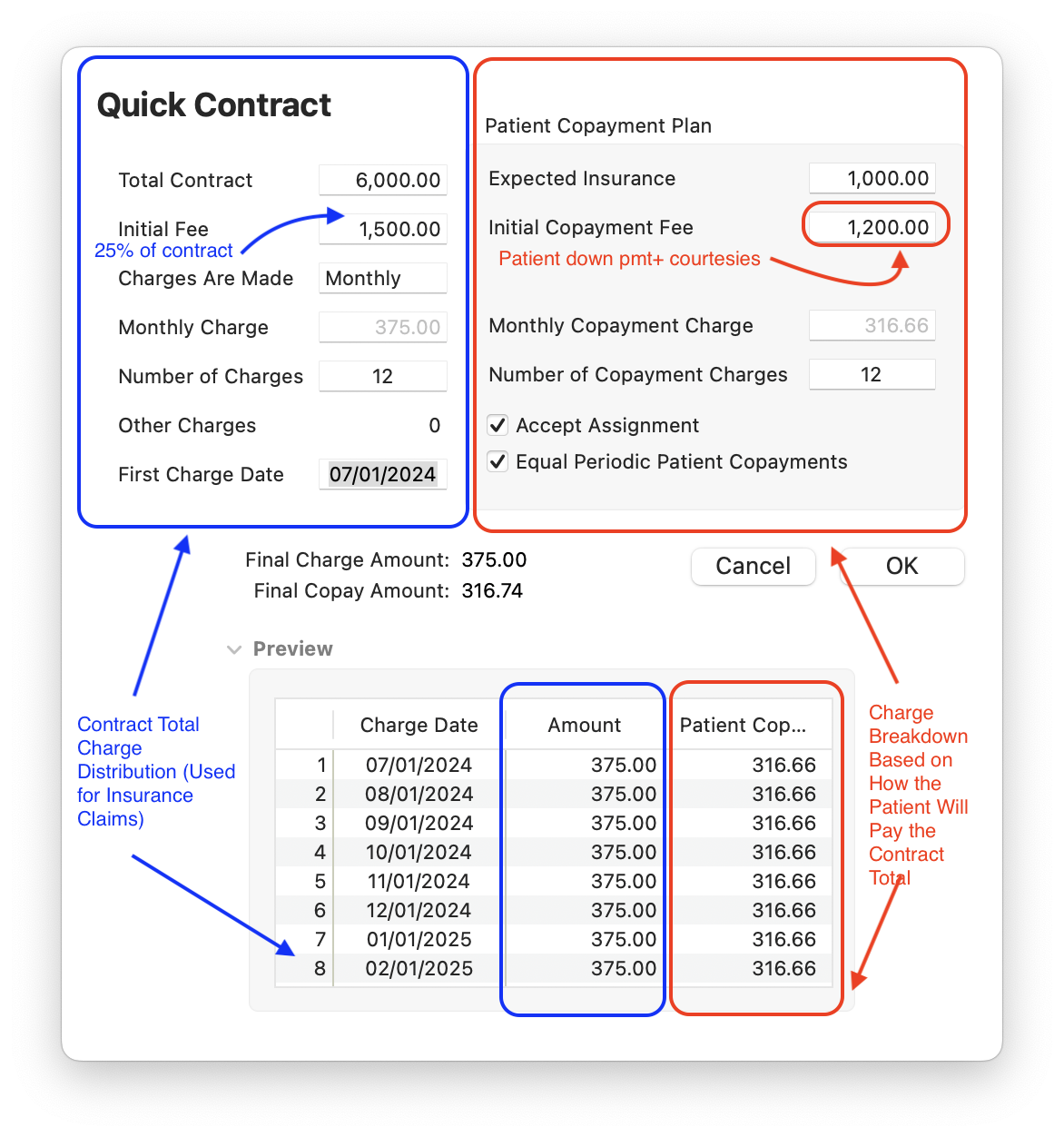
The LEFT side of the Quick Contract reflects the true contract total. It is used to enter contract totals regardless of insurance. These are the numbers the insurance company will see on the claim form. The patient co-pay IS NOT entered on the left side.
- Total Contract: The total amount charged for treatment.
- Initial Fee: The amount charged in the initial claim. This number is typically between 20-30% of the total treatment fee. In the example above, it is $1500 - 25% of $6000.
- Charges are Made: The frequency of the contract charges (which can be used for claims).
- Monthly Charge: How much you will submit to insurance per month. Typically you want to enter the number of treatment months first; Tops Ortho will then auto-calculate the monthly amount.
- Other Charges: Not used at this time.
- First Charge Date: Tops Ortho calculates this date based on the date that the Quick Contract is created. If the next month is more than three weeks away, the first payment will be scheduled for the that month. If the next month is less than three weeks away, Tops Ortho will schedule the first payment for the following month.
The RIGHT side of the Quick Contract is for entering Patient Copayment totals based on their expected insurance.
- Expected Insurance: The expected insurance benefit. Note: This may be less than the Initial Fee entered for insurance on the left side of the contract worksheet.
- Initial Copayment Fee: The amount charged to the patient to initiate treatment. This number should be the sum of what the patient is paying AND any adjustments due to courtesies or discounts they receive. For example, if the patient is paying $1000 for his down payment and he receives a $200 family discount, the Initial Fee amount is $1200.
- Monthly Copayment Charge: The amount you will charge the patient monthly. This does not have to match the amounts charged to insurance each month. You can enter an agreed upon monthly amount and Tops Ortho will auto-calculate the number of charges.
- Number of Copayment Charges: How many months patient will pay. You can enter an agreed upon number of copayment charges and Tops Ortho will auto-calculate the Monthly Copayment Charge. Note: This does not have to match the number of charges to insurance on the left side.
- Click OK.
-
The Contract Worksheet should be displayed. Verify all numbers are accurate.
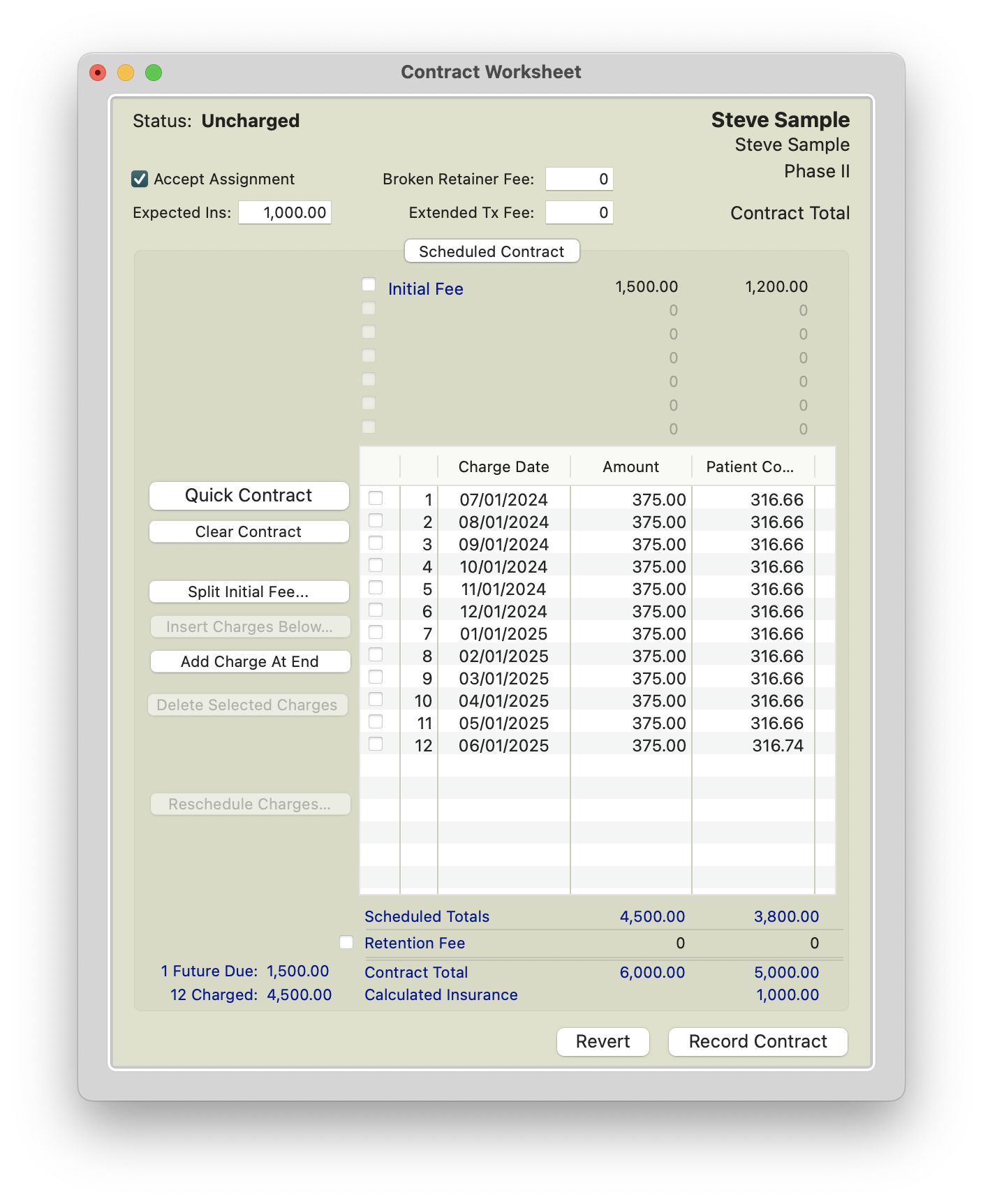
At this point, you may modify the contract as needed, including adjusting patient copay amounts, changing charge dates, or adding additional charge lines.
- The Amount Column must always equal the total contract amount and reflect what will be submitted to insurance.
- The Patient Copay Column reflects how the patient will be charged to pay their portion of the contract.
- Click Record Contract.
Contract Worksheet and Quick Contract Review
Initiating the Contract
Charging out a contract with insurance should be initiated on the date of initial placement.
Tops Tip: When entering details in the New Transactions window, always use the Tab key to advance to new fields.
- Go to Action > New Transaction or press Command T to open the New Transactions window.
- Confirm you have the correct patient and account holder listed in the New Transactions window.
- Select Initial Fee for the Payment/fee type, and choose the recorded contract you wish to activate. Click Use Selected Contract.

- Enter your note and click the Tab key.
- You can choose to charge out the Initial Fee, the courtesy(s) and/or the patient's payment in a single transaction window or in separate transaction windows.
-
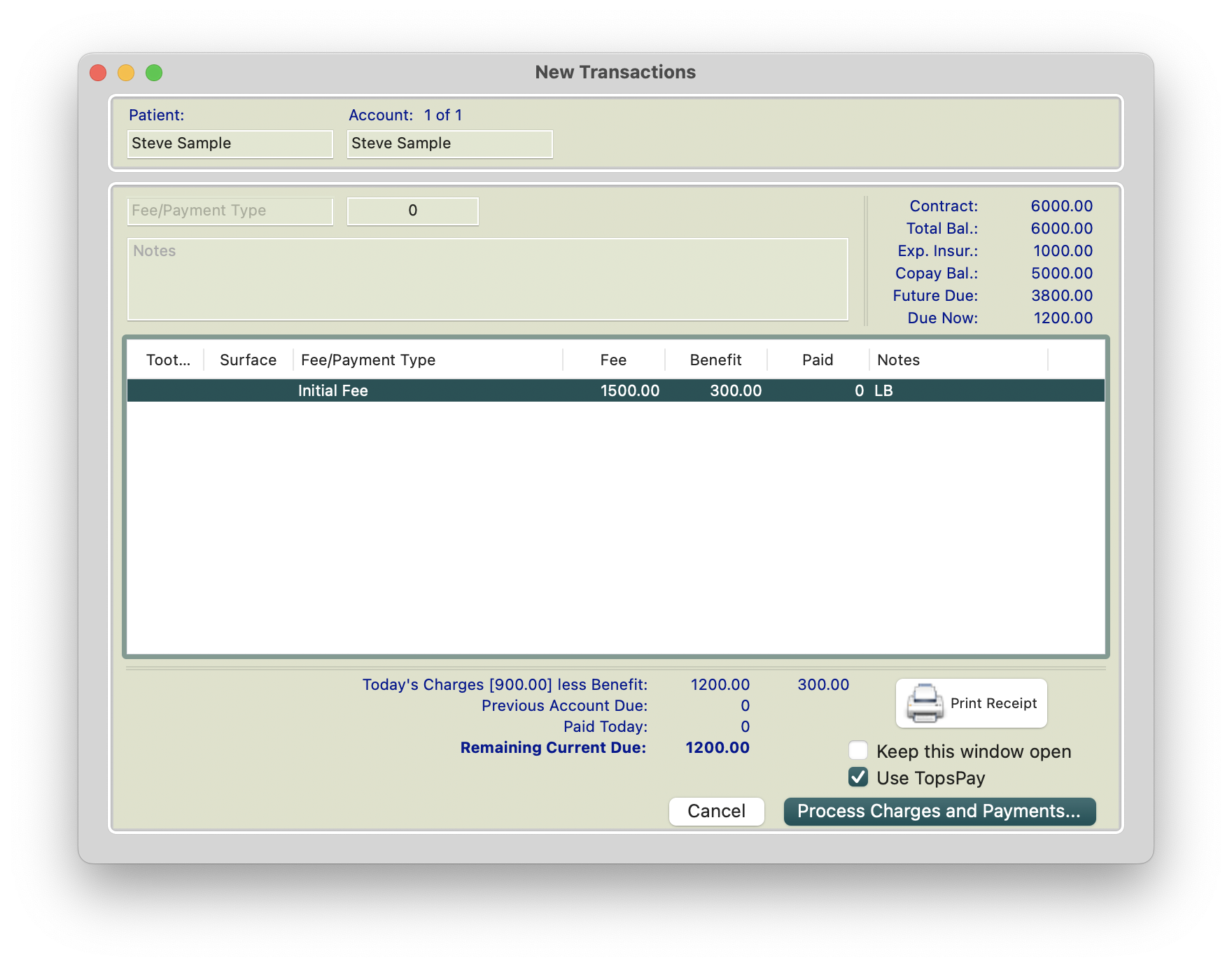
If you choose to only post the initial fee and no other transactions, your window reflects the example below.
-
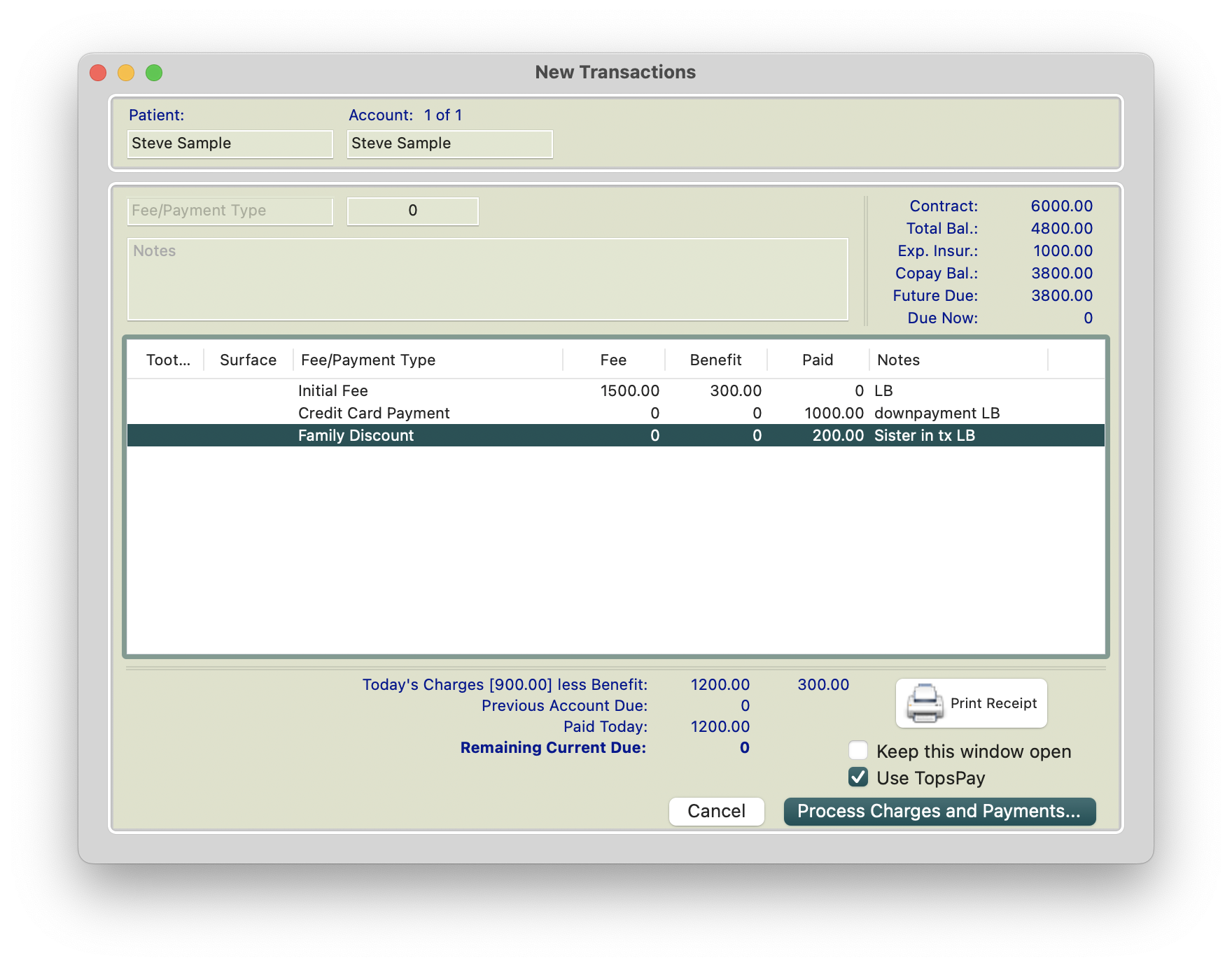
If you choose to process all in a single transaction window, use the Tab key to move the cursor back up to the Fee/Payment Type field until you have entered all transactions. See example below.
-
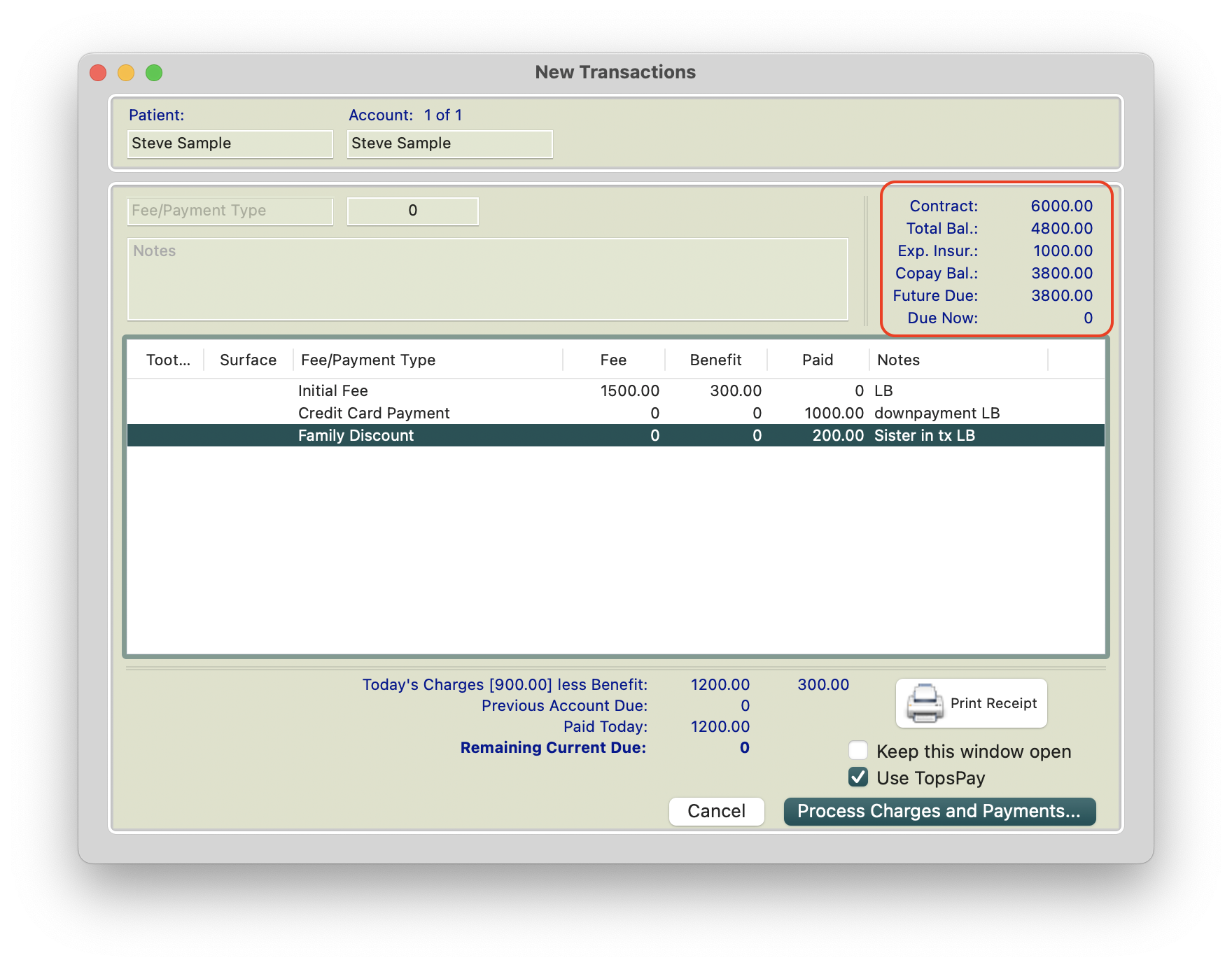
- ALWAYS review your financial snapshot for accuracy before clicking the Process Charges and Payments button.
- The initial fee cannot be voided nor can the date be changed once the fee has been processed.
-
If you need to remove a transaction from the Transaction window, highlight the fee and use Command-Delete or Edit>Clear to remove it without needing to cancel the transaction window.
- Active contracts will show one or two dots next to the contract total.
- Contracts without insurance will display one dot.
- Contracts with insurance will display two dots.
- Deactivated contracts will display a dash.

|

|
For more information, steps and screenshots when creating contract, please see the Knowledge Base article titled Contract Basics.
The Initial Fee, the New Transactions window and the Ledger
The New Transactions window
When charging the Initial Fee in the New Transactions window, you may notice the displayed amount does not match the patient’s Initial Fee.
The Initial Fee in the first column of the contract worksheet represents the amount charged at contract initiation for insurance and financial reporting purposes.
The Initial Fee in the second column represents the amount posted to the patient’s ledger. This reflects the patient’s down payment plus any courtesy adjustments.
When Tops records contract charges:
- The amount from the first column is recorded for contract financial reporting.
- The amount from the second column is posted to the patient’s ledger as the amount the patient is paying toward their responsibility.
- The patient is only charged the amount shown in the second column.


What is the Benefit field?
When a charge (such as the Initial Fee) is posted, the Benefit amount in the New Transactions window represents the difference between:
- The full contract charge (Column 1), and
- The amount charged to the patient (Column 2)
Example:
$1500 (Column 1) -$1200 (Column 2) = $300 Benefit

The CoPayment and Combined Ledgers
- In this example:
- Initial Fee (Column 1) = $1500
- Patient Copay (Column 2)=$1200
When the Initial Fee is charged:
- Combined Ledger
-
$1500 posts as a charge based on Column 1 of the contract.
The full $6000 was already recorded as production at contract initiation.
The Combined Ledger reflects:
- How much of the contract has charged out according to Column 1, and
- The payments applied toward those charges from both the patient and insurance.
- These charges reduce the remaining contract balance but are not counted as new production.
-


-
Copayment Ledger
- $1200 posts toward the patient’s total responsibility of $5000.
- The remaining patient copay balance is $5000 minus the $1200 initial fee.
- The additional $1000 of the total contract is expected from insurance and is not included in the patient’s copayment balance.


